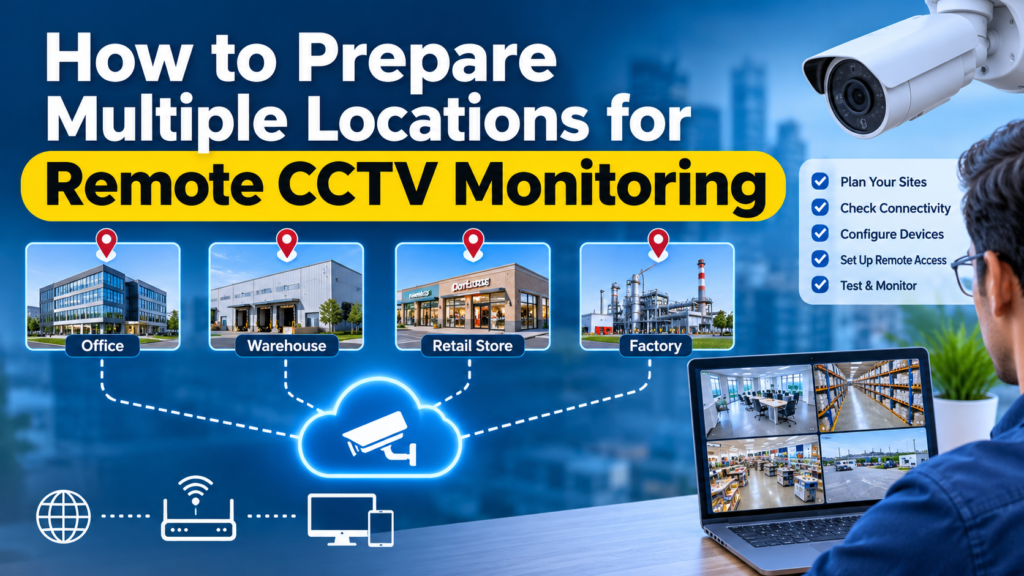
How to Prepare Multiple Locations for Remote CCTV Monitoring
Managing CCTV cameras across multiple business locations can become difficult when every site has different equipment, operating hours, security priorities and incident reporting procedures.
For businesses considering outsourced CCTV monitoring, preparation is essential. Before connecting multiple locations to a remote monitoring operation, organisations should assess their camera infrastructure, establish reliable connectivity, identify priority surveillance areas, document site-specific instructions and define who should receive incident notifications.
A structured preparation process helps businesses establish clearer monitoring responsibilities and makes it easier to coordinate surveillance across warehouses, retail outlets, offices, construction sites and commercial properties.
This guide explains how to prepare multiple business locations for remote CCTV monitoring and what to check before choosing an outsourcing provider.
Why Is Preparing Multiple CCTV Locations Important?
A business operating from one location may have a relatively straightforward surveillance arrangement. However, managing cameras across several sites introduces additional operational requirements.
For example, a retail company might operate 15 outlets across different cities. Each outlet could have different camera layouts, opening hours, network conditions and authorised personnel.
A warehouse may require attention to loading areas and restricted storage zones, while a retail outlet may prioritise entrances, checkout areas and inventory sections.
Connecting these locations to a remote monitoring service without documenting their differences can create confusion.
Common challenges include:
- Different CCTV camera brands and recording systems.
- Inconsistent internet connectivity between locations.
- Unlabelled camera feeds and unclear site identification.
- Different operating hours and after-hours access schedules.
- Missing or outdated emergency contact information.
- Unclear incident notification and escalation procedures.
- Difficulty identifying responsibility for camera or connectivity failures.
The solution is to establish a standard onboarding process while allowing individual locations to retain their specific monitoring instructions.
1. Prepare a Complete Inventory of CCTV Locations
Start by creating a list of every location that requires remote CCTV monitoring.
Do not rely only on the total number of cameras. A monitoring provider needs to understand the layout, purpose and operational requirements of each site.
Create a location inventory containing:
- Site name and unique identification number.
- Physical address and country.
- Business or facility type.
- Number of installed CCTV cameras.
- Camera locations and coverage areas.
- DVR or NVR equipment details.
- Video management software, where applicable.
- Internet connectivity information.
- Required monitoring hours.
- Primary site contact.
- Secondary escalation contact.
For example, a business with multiple warehouses should identify each warehouse separately rather than submitting one combined camera count.
This makes it easier to identify technical differences and establish location-specific monitoring instructions.
2. Check Camera Quality and Existing CCTV Infrastructure
Before outsourcing monitoring, review the condition and configuration of the existing CCTV systems.
An installed camera does not automatically guarantee that its footage is suitable for remote monitoring.
The quality of the available video depends on several factors, including camera resolution, positioning, lighting, network performance and the area being observed.
Evaluate the following:
Camera positioning: Check whether important areas such as entrances, loading docks, restricted access points and storage areas are visible.
Image quality: Confirm that the footage provides sufficient detail for the intended monitoring task.
Night-time visibility: Review whether important areas remain visible under low-light conditions.
Recording equipment: Identify the DVR, NVR or compatible video management system used at each location.
Camera accessibility: Confirm whether authorised remote access can be configured.
Equipment condition: Identify cameras that are damaged, disconnected or producing unclear footage.
Businesses should also identify blind spots and areas where camera positioning may need improvement.
A monitoring provider cannot reliably assess activity in an area that the camera does not adequately capture.
3. Establish Reliable Internet Connectivity at Every Site
Internet connectivity is one of the most important requirements for remote CCTV monitoring.
Even when cameras and recording equipment are functioning correctly, an unstable network connection can interrupt access to live video feeds.
Before onboarding a location, evaluate:
- Available upload bandwidth.
- Network stability during operating and non-operating hours.
- Router and network equipment condition.
- Internet service interruptions.
- Network access restrictions.
- Backup connectivity arrangements, where required.
The bandwidth requirement will depend on the number of cameras, video resolution, frame rate, compression settings and monitoring method.
For this reason, there is no single internet speed that suits every CCTV installation.
Businesses should provide the monitoring provider with the relevant technical details so that connectivity requirements can be assessed before activation.
It is also important to establish who is responsible when a feed becomes unavailable.
For example, the monitoring provider may be responsible for reporting an inaccessible feed, while the local IT team or CCTV maintenance provider may need to investigate and restore connectivity.
These responsibilities should be agreed in advance.
4. Create a Site-Specific Monitoring Instruction Document
One of the most important preparation steps is documenting what the monitoring team should look for at each location.
A generic instruction such as “monitor the warehouse” does not provide enough operational detail.
Different locations may have different security priorities.
For example:
Retail outlets
- Monitor designated entrances and exits.
- Review activity in agreed restricted areas.
- Identify unusual activity during closing hours.
- Follow the approved procedure for suspicious after-hours access.
Warehouses
- Monitor loading and unloading areas.
- Observe designated storage and restricted zones.
- Identify unusual movement outside authorised schedules.
- Follow escalation instructions for suspicious access.
Construction sites
- Monitor site entrances and perimeter areas.
- Observe designated equipment storage locations.
- Review activity outside approved working hours.
- Escalate potential unauthorised entry.
Corporate offices
- Monitor designated entry points.
- Review access to restricted areas.
- Follow agreed after-hours surveillance instructions.
- Notify authorised contacts about relevant incidents.
The instructions should distinguish between normal operational activity and events requiring attention.
For example, a warehouse may receive authorised deliveries late at night. Without an updated delivery schedule, normal business activity could be mistaken for suspicious behaviour.
A good monitoring instruction document should include:
- Site identification and operating schedule.
- Camera names and monitored areas.
- Priority surveillance zones.
- Activities requiring review.
- Events that should be reported.
- Notification and escalation instructions.
- Authorised access schedules.
- Emergency contact details.
5. Establish Clear Incident Notification and Escalation Procedures
Remote CCTV monitoring is useful only when identified incidents reach the appropriate people through an agreed process.
Businesses should decide who is responsible for receiving notifications and what happens when the first contact is unavailable.
For each location, establish:
- Primary security contact.
- Secondary contact.
- Site manager or authorised representative.
- Escalation contact for urgent situations.
- Approved notification channels.
- Required incident information.
- Acknowledgement and follow-up procedures.
A sample incident escalation structure could look like this:
Stage 1 – Event identification: The monitoring operator identifies an activity that meets the agreed reporting criteria.
Stage 2 – Verification: The operator reviews the available footage and follows the defined verification procedure.
Stage 3 – Notification: The designated contact receives the relevant alert and available incident details.
Stage 4 – Escalation: If the primary contact does not acknowledge the notification within the agreed period, the next authorised contact is notified.
Stage 5 – Documentation: The incident and actions taken are recorded according to the agreed reporting requirements.
The actual workflow should be customised for each business.
It is also important to distinguish remote incident monitoring from physical security response. A remote operator does not automatically have the authority or ability to attend a site, intervene physically or dispatch emergency services.
6. Organise Camera Feeds with Consistent Naming Conventions
When monitoring several locations, identifying the correct camera quickly matters.
Generic camera names such as Camera 01, Camera 02 and Camera 03 become difficult to manage when feeds from multiple locations are combined.
Instead, use a consistent naming convention.
For example:
- STORE-01-ENTRANCE
- STORE-01-CASH-AREA
- WH-01-LOADING-DOCK
- WH-01-STORAGE-ZONE
- OFFICE-01-RECEPTION
- SITE-01-PERIMETER
The naming format can include:
- Site identification.
- Camera identification.
- Monitored area.
Maintain an updated camera map or site layout showing where each camera is positioned.
This helps the monitoring team identify the relevant location and camera when reviewing an event or preparing an incident report.
It also makes future expansion easier when additional cameras or business locations are added.
7. Review Data Security and Remote Access Permissions
CCTV footage may contain information about employees, customers, visitors, suppliers and business operations.
Therefore, remote access should be established through an approved and controlled process.
Before providing access to an outsourced monitoring provider, review:
- Who is authorised to access the video feeds.
- Whether access can be restricted by location.
- How monitoring credentials are protected.
- Whether access activity can be audited.
- How user permissions are reviewed.
- How access is revoked when a contract ends.
- Which party manages footage retention and deletion.
- How incidents involving footage access are reported.
Use individual authorised accounts and appropriate access restrictions rather than sharing unrestricted administrator credentials.
For businesses operating internationally, privacy and surveillance requirements should also be reviewed according to the countries and jurisdictions where cameras are installed.
The business and its monitoring provider should document their respective responsibilities for data access, processing, retention and security.
8. Conduct a Pilot Before Expanding to Every Location
Connecting every location at the same time may introduce unnecessary operational complexity.
A better approach is to begin with a small pilot deployment.
Select one or two representative locations that reflect the different camera systems and operating environments used across the business.
During the pilot, verify:
- Live video feed accessibility.
- Camera identification and naming.
- Video quality.
- Network stability.
- Monitoring instructions.
- Incident notification procedures.
- Contact acknowledgement.
- Incident reporting format.
- Technical fault reporting.
Run agreed test scenarios with authorised site personnel to check whether the notification and escalation process works as expected.
Record any technical or operational gaps and correct them before adding more locations.
Once the pilot is satisfactory, additional sites can be onboarded using the same documented process.
9. Define Performance Measures for Ongoing Monitoring
Outsourcing CCTV monitoring should not mean losing visibility into service performance.
Businesses should establish practical measures that help them review whether the agreed monitoring activities are being performed.
Useful performance indicators include:
Feed availability: Whether the agreed camera feeds remain accessible.
Incident review time: How long it takes to review an event after it enters the agreed monitoring workflow.
Notification time: Whether incident notifications are communicated within the contracted targets.
Reporting completeness: Whether incident records contain the required site, camera, time and action details.
Escalation compliance: Whether the agreed contact sequence is followed.
Technical issue reporting: Whether unavailable feeds and recurring connectivity problems are reported to the responsible team.
Instruction updates: Whether changes to site schedules, contacts and monitored areas are reflected in the monitoring instructions.
Performance targets should be agreed in the service contract. Businesses should not assume that all monitoring providers follow identical operating procedures or response-time commitments.
10. Prepare a Standard Onboarding Checklist for Every New Location
Once the first locations are configured, create a repeatable onboarding checklist.
This helps the organisation maintain consistency as it expands to new branches, offices, warehouses or project sites.
Remote CCTV Monitoring Readiness Checklist
- Site details and physical address documented.
- Camera inventory completed.
- DVR/NVR and video management details recorded.
- Camera positioning and video quality checked.
- Internet connectivity assessed.
- Remote video access compatibility confirmed.
- Camera names standardised.
- Priority monitoring areas identified.
- Site-specific monitoring instructions approved.
- Operating hours and authorised schedules documented.
- Primary and secondary contacts verified.
- Incident escalation procedure approved.
- Remote access permissions reviewed.
- Privacy and data responsibilities documented.
- Pilot monitoring and notification tests completed.
- Reporting and performance requirements agreed.
Completing this checklist before activation can reduce avoidable onboarding confusion and provide a clearer foundation for multi-site monitoring.
How OURS GLOBAL Supports Remote CCTV Monitoring for Multiple Locations
Businesses operating across multiple locations need a monitoring arrangement that reflects their individual site requirements rather than treating every camera feed in exactly the same way.
OURS GLOBAL provides outsourced CCTV monitoring services for businesses looking for remote surveillance support.
Its service offering includes:
24/7 CCTV Monitoring: Monitoring arrangements for agreed surveillance requirements across designated coverage periods.
Live CCTV Monitoring: Remote monitoring of live video feeds.
Incident Detection and Alerting: Identification of unusual activities and notification according to agreed procedures.
Remote Site Monitoring: Centralised monitoring support for businesses operating across multiple locations.
Customised Monitoring Solutions: Monitoring arrangements tailored to individual business and operational requirements.
These services are relevant to businesses such as retail chains, warehouses, construction companies, commercial facilities and organisations managing distributed premises.
The actual monitoring scope, technical compatibility, operating arrangements and escalation responsibilities should be confirmed during the proposal and onboarding process.
If your organisation is planning to outsource CCTV monitoring, preparing the location inventory, camera details, operating schedules and escalation contacts is a useful starting point.
Explore OURS GLOBAL’s Outsourced CCTV Monitoring Services to discuss your requirements.
Frequently Asked Questions About Remote CCTV Monitoring Across Multiple Locations
1. Can one remote monitoring provider monitor CCTV cameras across multiple business locations?
Yes. A remote monitoring provider can support multiple business locations when the camera systems, connectivity, access arrangements and monitoring scope are suitable. Each location should have its own identification, monitoring instructions and escalation contacts.
2. What information is required to outsource CCTV monitoring?
Businesses should prepare site addresses, camera inventories, DVR or NVR details, video management system information, connectivity details, monitoring schedules, priority areas and authorised contact information.
3. Can existing CCTV cameras be connected to remote monitoring services?
Potentially, yes. Existing CCTV infrastructure may be suitable if the cameras, recording equipment, software, network and remote access arrangements are compatible. A technical assessment is recommended before onboarding.
4. Does remote CCTV monitoring require a separate internet connection?
Not necessarily. Existing network infrastructure may be suitable, depending on bandwidth, stability, security configuration and monitoring requirements. The required connectivity should be assessed for each location.
5. How do monitoring operators identify which location has an incident?
Consistent site identification, camera naming conventions and location-specific monitoring instructions help operators identify the relevant premises and monitored area when reviewing an event.
6. Does outsourced CCTV monitoring include physical security response?
Not automatically. Remote monitoring generally involves reviewing video activity and communicating incidents according to agreed procedures. Physical intervention, guard attendance and emergency response must be separately arranged and clearly assigned.
7. How can a business expand CCTV monitoring to additional branches?
Businesses can use a standard onboarding process for every new location. This should include technical assessment, camera inventory, connectivity checks, monitoring instructions, contact verification and testing before activation.
8. What should businesses check before choosing a remote CCTV monitoring company?
Evaluate monitoring coverage, technical compatibility, incident verification procedures, escalation arrangements, data security, reporting, commercial terms and clearly defined service responsibilities.
Prepare Your Locations for Outsourced CCTV Monitoring
Managing CCTV across multiple locations requires coordination between camera infrastructure, network connectivity, site personnel and monitoring operations.
A well-prepared onboarding process helps businesses establish consistent monitoring instructions while accounting for the operational differences between individual sites.
Before outsourcing, assess your existing CCTV infrastructure, document priority areas, verify remote access requirements and establish a clear incident escalation process.
OURS GLOBAL offers outsourced CCTV monitoring services, including live video monitoring, incident detection and remote site monitoring for businesses.
Looking to outsource CCTV monitoring for multiple business locations?
Visit OURS GLOBAL to discuss your surveillance requirements and request a monitoring proposal tailored to your business.